

Spot the words that matter. Without searching every page manually.
Meet TickMark, a simple browser extension that highlights the words and phrases you choose as you read. Find important terms at a glance, whether you’re exploring an article, learning something new, or reviewing a webpage.
No account required · No built-in tracking · Keywords stored locally
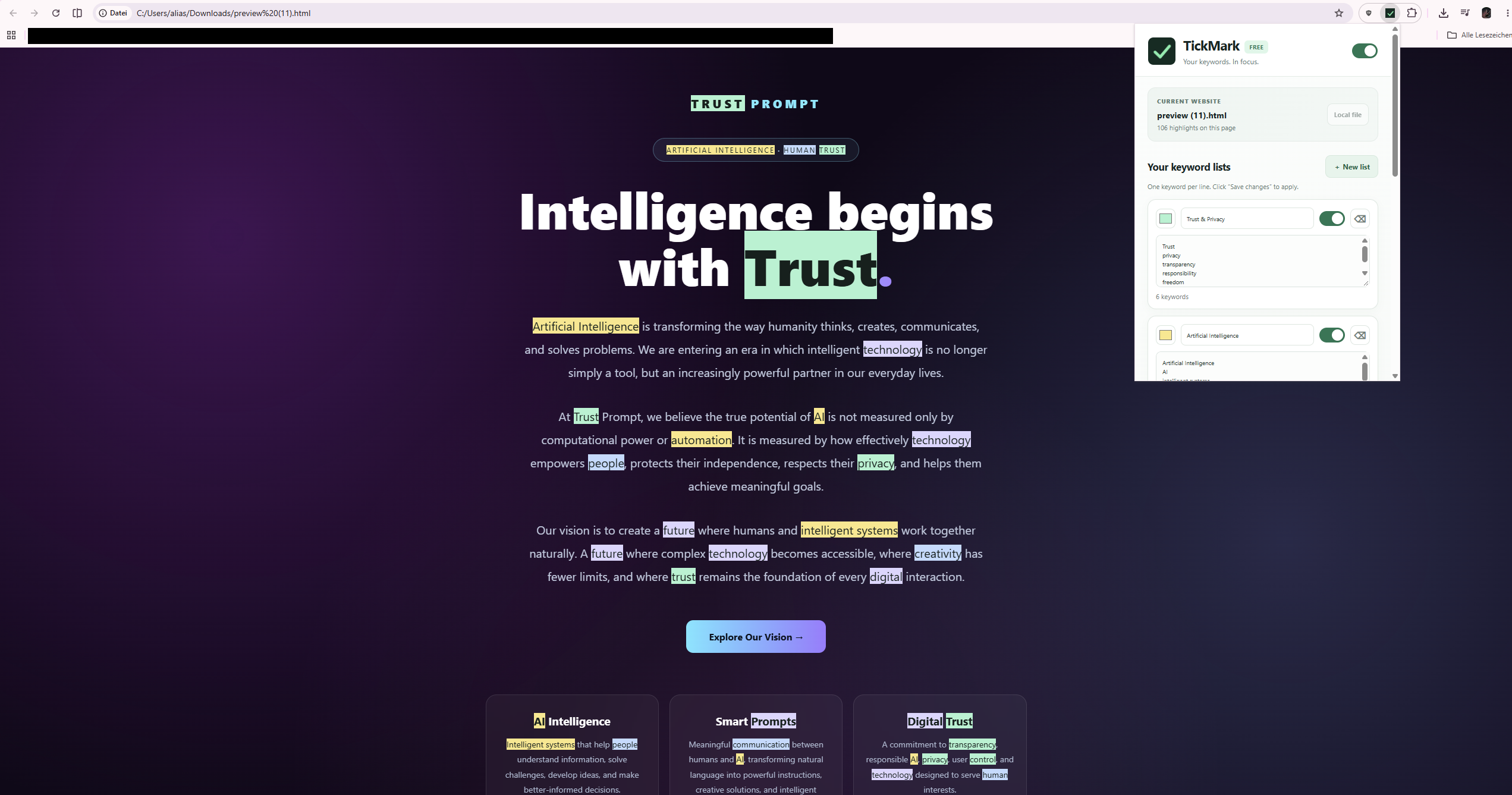
Easy to set up. Easier to stay focused.
Focus on the words that matter to you. TickMark automatically highlights terms on supported webpages.
Highlight keywords
Add words and phrases you want to keep an eye on and spot them instantly as you read.
Lists and colors
Organize keywords into separate lists and assign a different highlight color to each list.
Control matching
Choose whether matching should be case-sensitive or limited to whole words.
Exclude websites
Pause TickMark on specific domains or disable highlighting globally.
Import and export
Back up and transfer your keyword configuration using a local JSON file.
Runs in your browser
Keyword matching and highlighting happen on your device. No account or backend is needed for the core functionality.
Find the words you care about. Anywhere you browse.
A simple way to notice specific words and phrases across webpages—whether you are reading, studying, researching, or working in an environment with strict privacy requirements.
Everyday browsing
Spot names, topics, and phrases in articles, guides, and other webpages without searching manually.
Learning & research
Highlight important terms while studying a subject or comparing information across multiple sources.
Privacy-conscious environments
Use local keyword highlighting without sending the scanned webpage text or your keyword lists to our servers. TickMark is not a compliance certification or security assessment tool.
Get started in three steps
Install the extension
Add TickMark to Chrome and open the extension popup.
Create a keyword list
Enter your keywords, choose a color, and enable the list.
Browse websites
Matching terms are highlighted on supported webpages.
Your keywords stay on your device.
TickMark is built for local processing. In the current version, keyword lists and settings are saved in Chrome’s local extension storage. Webpage text processed for highlighting is not sent to Media Train OÜ servers.
No cloud required
Keyword matching happens locally on the webpage you visit.
No built-in tracking
The extension currently has no analytics, advertising, or telemetry services.
You stay in control
You choose your keyword lists, highlight colors, and website exclusions.
For details on how the Chrome extension processes information, read our TickMark Privacy Policy. Website hosting and service privacy practices are addressed separately.
Frequently asked questions
Is TickMark free?
Yes. The current version is intended to be a free Chrome extension.
Do I need an account?
No. The current core functionality does not require a TickMark account.
Why does TickMark need access to webpages?
To automatically highlight your chosen keywords, TickMark needs to examine webpage text locally. This does not work on every browser-internal or restricted page.
Is webpage content sent to Media Train OÜ?
No. The current extension processes webpage text locally and does not send it to the provider’s servers.
Does TickMark evaluate the content of a webpage?
No. TickMark only finds and visually highlights the words you choose. It does not judge or verify webpage content.