

Artificial intelligence tools like ChatGPT are rapidly becoming part of everyday business workflows.
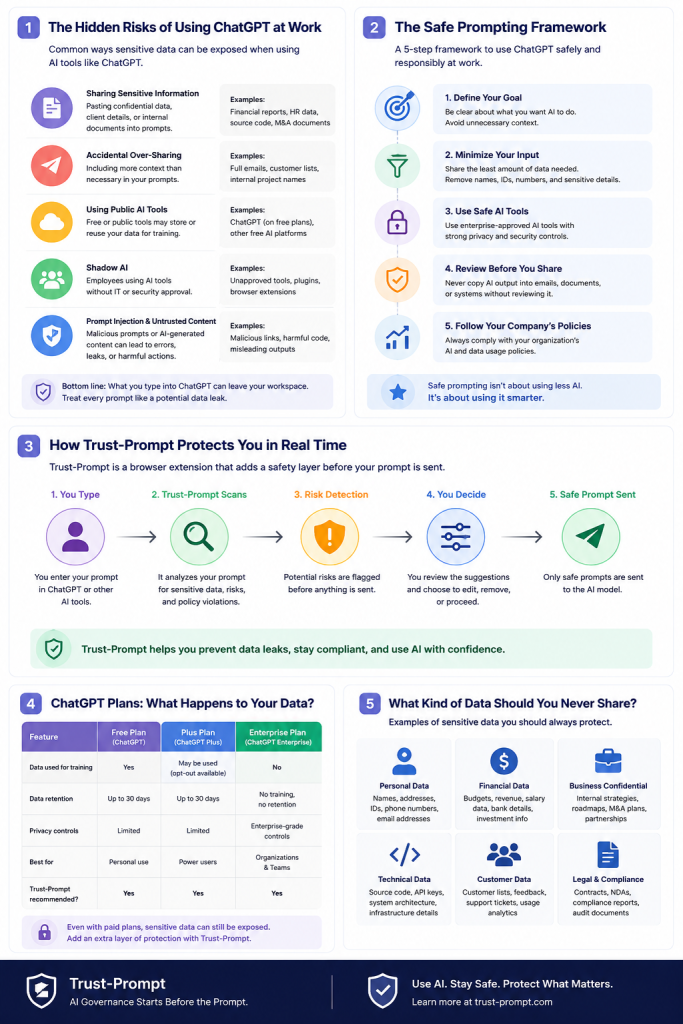
Employees now use AI to:
- write emails
- summarize meetings
- analyze documents
- generate reports
- improve customer support
- create marketing content
- assist with coding
- accelerate research
For many organizations, AI tools increase productivity significantly.
However, they also introduce a growing security and governance challenge.
Many AI-related incidents are not caused by malicious attacks.
They happen because employees accidentally share:
- customer information
- confidential business data
- internal strategies
- source code
- legal documents
- API keys
- financial information
- healthcare records
into public AI systems.
This is one of the fastest-growing forms of organizational risk today.
The challenge is not simply “using AI.”
The challenge is using AI safely.
This guide explains:
- why AI data leaks happen
- the risks of unsafe AI usage
- how organizations can reduce exposure
- best practices for employees
- why browser-level governance matters
- how preventive AI governance helps protect sensitive information before prompts are sent
Why AI Data Leaks Happen at Work
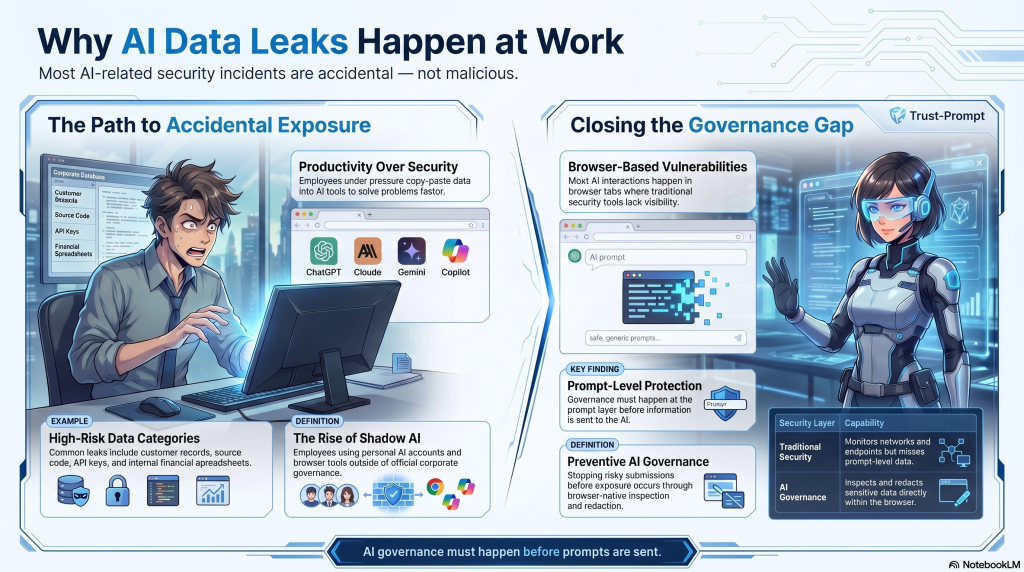
Most AI data leaks are accidental and are becoming the biggest Cybersecurity story of today.
Employees are often trying to work faster, solve problems quickly, or simplify repetitive tasks.
Under pressure, people naturally copy and paste information into AI tools without fully considering the consequences.
Common examples include:
- support agents pasting customer conversations
- developers sharing production code
- finance teams uploading spreadsheets
- marketers using unreleased campaign plans
- legal teams summarizing contracts
- HR staff reviewing employee documentation
In many cases, employees do not realize:
- the sensitivity of the information
- where the data is being processed
- how prompts may be stored
- whether uploads are retained
- whether governance policies apply
This is often called “shadow AI.”
Shadow AI refers to employees using AI tools outside approved governance processes.
The problem is growing rapidly because AI tools are:
- easy to access
- browser-based
- widely adopted
- integrated into daily workflows
- difficult for organizations to monitor
Traditional cybersecurity systems were not designed for prompt-based AI interactions.
As a result, many organizations now face governance gaps around browser AI usage.
Common Risks When Using ChatGPT at Work
Using ChatGPT safely at work requires understanding the most common risk categories.
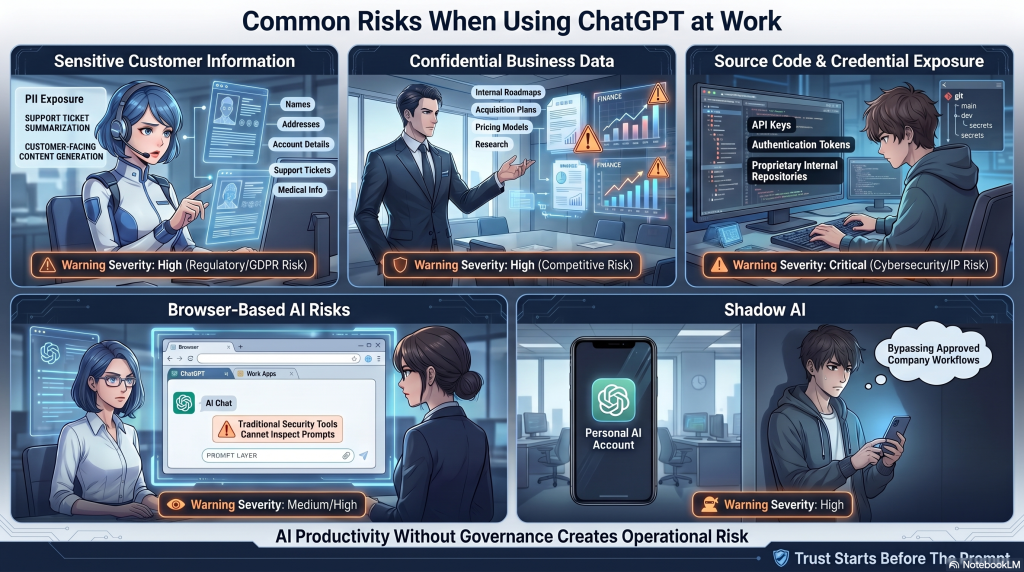
Sensitive Customer Information Exposure
One of the most common risks is employees accidentally sharing customer information.
Examples include:
- names
- addresses
- account details
- support tickets
- financial information
- medical information
- private conversations
Even well-intentioned employees may expose sensitive information while trying to:
- summarize a case
- draft a response
- analyze a problem
- generate customer-facing content
Organizations operating under privacy regulations such as GDPR must be especially careful about how customer information is processed.
Confidential Business Data Leakage
Employees often use AI tools to accelerate internal work.
This can lead to accidental exposure of:
- business strategies
- product roadmaps
- acquisition plans
- pricing models
- internal communications
- research documents
- operational processes
AI systems are increasingly being used inside high-pressure workflows where speed matters.
Without governance controls, employees may prioritize convenience over security.
Source Code and Credential Exposure
Developers frequently use AI systems to:
- debug issues
- explain code
- optimize functions
- generate scripts
However, prompts may accidentally contain:
- API keys
- authentication tokens
- internal repositories
- production credentials
- proprietary code
This creates both cybersecurity and intellectual property risks.
Browser-Based AI Risks
Most AI interactions happen directly inside the browser.
This creates a governance challenge because employees can quickly access:
- ChatGPT
- Claude
- Gemini
- Copilot
- Perplexity
- other browser-based AI systems
Traditional security tooling often lacks visibility at the prompt layer.
That means sensitive information may leave the organization before monitoring systems detect the issue.
Shadow AI and Unapproved Usage
Many organizations have AI policies.
However, employees may still:
- use personal AI accounts
- bypass approved workflows
- upload documents into public AI tools
- use AI without governance oversight
This creates a rapidly expanding shadow AI problem.
Without practical governance controls, organizations often struggle to balance:
- productivity
- employee flexibility
- security
- compliance
- operational speed
Best Practices for Safe ChatGPT Usage at Work
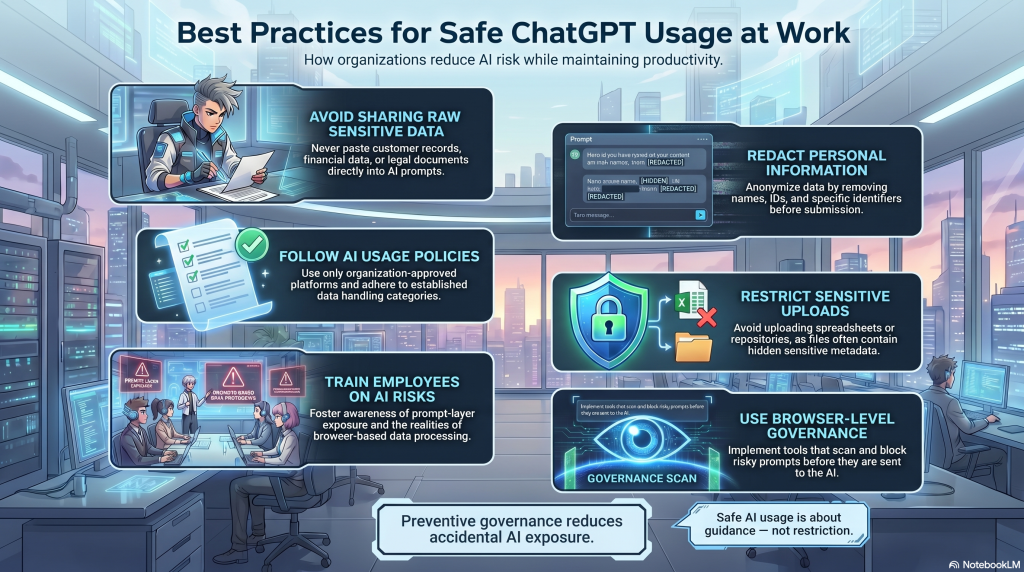
Organizations do not need to ban AI usage.
Instead, they need practical governance strategies that reduce risk while allowing employees to work productively.
Never Paste Raw Sensitive Data
Employees should avoid pasting sensitive information directly into AI tools.
This includes:
- customer records
- financial data
- legal documentation
- healthcare information
- employee records
- confidential internal materials
Before using AI tools, teams should evaluate:
- whether the data is necessary
- whether the information can be anonymized
- whether redaction is possible
- whether organizational policies permit usage
Redact Sensitive Information Before Sending Prompts
Redaction is one of the simplest and most effective AI governance practices.
Examples:
Instead of:
“Customer John Smith at ACME Corp reported account number 483920…”
Use:
“A customer reported an account issue involving billing access…”
Removing unnecessary identifiers significantly reduces risk.
Organizations should encourage employees to:
- anonymize customer data
- remove names
- exclude credentials
- avoid confidential attachments
- minimize unnecessary context
Use Clear AI Usage Policies
Every organization using AI tools should establish clear governance policies.
Policies should define:
- approved AI platforms
- prohibited data categories
- acceptable use cases
- upload restrictions
- employee responsibilities
- compliance expectations
- escalation procedures
Policies should be practical and understandable.
Overly restrictive policies often fail because employees bypass them.
The goal is to enable safe AI usage — not eliminate productivity.
Restrict Sensitive Uploads
File uploads create significantly higher risk than normal prompts.
Organizations should define restrictions around uploading:
- contracts
- spreadsheets
- internal reports
- customer exports
- healthcare documents
- source code repositories
Employees often underestimate how much sensitive information exists inside uploaded files.
Train Employees on AI Risks
Many employees are not intentionally violating policy.
They simply lack awareness.
AI governance training should explain:
- prompt risks
- AI data leakage
- browser-based exposure
- shadow AI
- acceptable usage
- data handling expectations
Training should use practical examples instead of abstract compliance language.
Employees are more likely to follow governance rules when the risks feel real and understandable.
Use Browser-Level AI Protection
Most AI interactions happen inside the browser.
This makes browser-native governance increasingly important.
Browser-level controls can help organizations:
- inspect prompts before submission
- detect sensitive information
- apply governance rules
- warn employees
- block risky submissions
- reduce accidental disclosure
Preventive governance is often more effective than reactive monitoring.
Stopping risky prompts before they are sent is significantly safer than attempting to detect exposure afterward.
Why Browser-Level AI Governance Matters
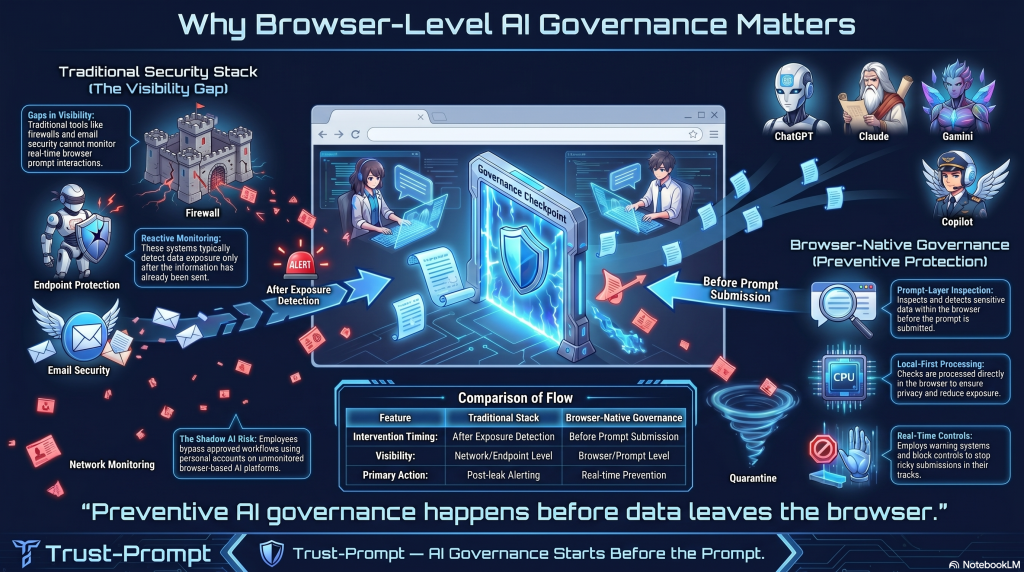
Most organizations already have:
- firewalls
- endpoint protection
- email security
- network monitoring
- DLP systems
However, many of these tools were not designed for browser-based AI interactions.
AI usage changes how information moves through organizations.
Employees can now copy and paste sensitive information directly into external AI systems within seconds.
This creates a governance gap.
Browser-level AI governance helps close that gap.
Instead of waiting for post-exposure detection, browser-native governance introduces preventive controls directly where prompts are created.
This is increasingly important because:
- AI adoption is accelerating
- browser workflows dominate AI usage
- shadow AI continues to grow
- employees need productivity tools
- organizations need practical controls
Preventive governance at the prompt layer helps organizations reduce risk before exposure occurs.
The Importance of Local Processing and Privacy-First AI Governance
Trust is one of the biggest challenges in AI governance.
Many organizations are concerned about:
- cloud processing
- telemetry collection
- third-party visibility
- centralized monitoring
- sensitive data retention
Privacy-first AI governance focuses on minimizing unnecessary exposure.
Local-first governance models help reduce risk by processing prompt checks directly inside the browser environment.
Benefits of local processing may include:
- reduced external data exposure
- improved privacy posture
- lower governance complexity
- stronger user trust
- clearer explainability
Explainable governance is also important.
Employees are more likely to follow governance systems when they understand:
- why prompts are flagged
- what triggered a warning
- which policies apply
- how to correct issues safely
Opaque or overly aggressive controls often create friction and policy avoidance.
How Organizations Can Build Safer AI Workflows
Safe AI usage is not only about blocking risk.
It is about creating workflows that employees can realistically follow.
Organizations should focus on:
- practical governance
- lightweight controls
- employee education
- privacy-first architecture
- browser-level visibility
- clear acceptable-use policies
A strong AI governance strategy typically includes:
- Approved AI usage policies
- Prompt handling guidance
- Browser-level governance controls
- Sensitive data detection
- Upload restrictions
- Employee awareness training
- Governance accountability
- Regular policy reviews
Organizations that establish governance early are generally better positioned to scale AI adoption safely.
Safe ChatGPT Usage Checklist for Employees
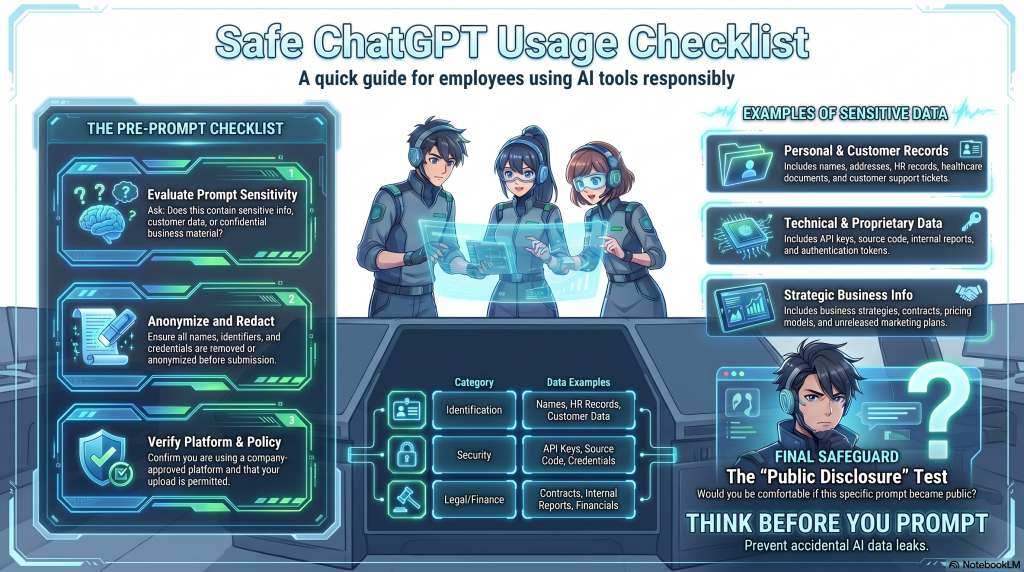
Before using ChatGPT or other AI tools at work, employees should ask:
- Does this prompt contain sensitive information?
- Am I sharing customer data?
- Does this include confidential business material?
- Can the information be anonymized?
- Is this upload permitted by company policy?
- Am I using an approved AI platform?
- Would I be comfortable if this prompt became public?
Safe AI usage habits can significantly reduce accidental disclosure risk.
Frequently Asked Questions
Is ChatGPT safe to use at work?
ChatGPT can be used safely at work when organizations apply proper governance controls, employee guidance, and data handling practices.
The biggest risks typically come from accidental disclosure of sensitive information.
Can ChatGPT leak company data?
Yes! ChatGPT DOES leak sensitive company data. AI systems can create risk when employees share confidential information through prompts or uploads.
Organizations should establish governance policies and reduce unnecessary data exposure.
What is shadow AI?
Shadow AI refers to employees using AI tools outside approved governance or security processes.
This often includes unapproved browser-based AI usage.
Why is browser-level AI security important?
Most AI interactions happen inside the browser.
Browser-level governance helps organizations apply preventive controls directly where prompts are created.
What is prompt-layer security?
Prompt-layer security refers to governance controls that inspect or evaluate prompts before they are submitted to AI systems.
The goal is to reduce accidental exposure of sensitive information.
Final Thoughts
AI tools are transforming how organizations work.
The challenge is no longer whether employees will use AI.
The challenge is how organizations can support AI usage safely.
The most effective AI governance strategies balance:
- productivity
- employee flexibility
- security
- privacy
- compliance
- operational efficiency
Organizations that adopt preventive AI governance early will likely be better prepared for:
- growing AI adoption
- regulatory pressure
- shadow AI risks
- browser-based workflows
- evolving enterprise governance expectations
As AI usage continues to expand, browser-native governance and prompt-layer protection are becoming increasingly important parts of modern security strategy.