

How Trust-Prompt works: local AI prompt checks and governance features
Trust-Prompt is a local AI governance layer that helps users and businesses check prompts before submission on supported AI websites. Instead of relying on remote prompt inspection, Trust-Prompt evaluates content locally in the browser, so users gain more control before sensitive data is shared.
This page explains how Trust-Prompt prompt checks work, how warning and block decisions appear before submission, and how Trust-Prompt Plus extends the core workflow with licensed governance features such as policies, scopes, upload policy, redaction, self-test, verification matrix, policy pack, and audit visibility.
If you want to compare products and licensing, you can visit the Trust-Prompt Pricing page, read why Trust-Prompt matters, review the Terms of Service, or check the Privacy Policy.
What Trust-Prompt does before a prompt is sent
Trust-Prompt adds a local pre-send checkpoint between the user and the AI website. Before submission, the product evaluates the input locally in the browser. As a result, the user gets a clearer decision before content leaves the page.
- Allow for normal content that does not trigger a stronger policy response
- Warn when potentially sensitive content should be reviewed before sending
- Block when clearly risky content should not leave the page
- Local-first evaluation instead of remote AI prompt analysis in the StoreBasic model
What Trust-Prompt Plus adds
Trust-Prompt Plus is the licensed version for professionals and smaller business environments that need more than basic prompt protection.
- Policies
- Scopes
- Upload Policy
- Redaction
- Self-Test
- Verification Matrix
- Policy Pack
- Audit Visibility
- License-based activation
- Support for more AI websites
Learn more on the Trust-Prompt Plus page or compare plans on the Pricing page.
Step 1: local prompt checks before submission
The first step in the Trust-Prompt workflow is the local prompt check. At this point, Trust-Prompt reviews the input before it is submitted to a supported AI website. Because the review happens before submission, users and businesses get more visibility and more control exactly when it matters.
Step 2: deterministic local analysis and rule-based decisions
Trust-Prompt uses deterministic and detector-based logic to classify relevant signals locally. That approach makes the workflow easier to understand, easier to test, and easier to govern than a hidden remote evaluation model.
Examples of signals
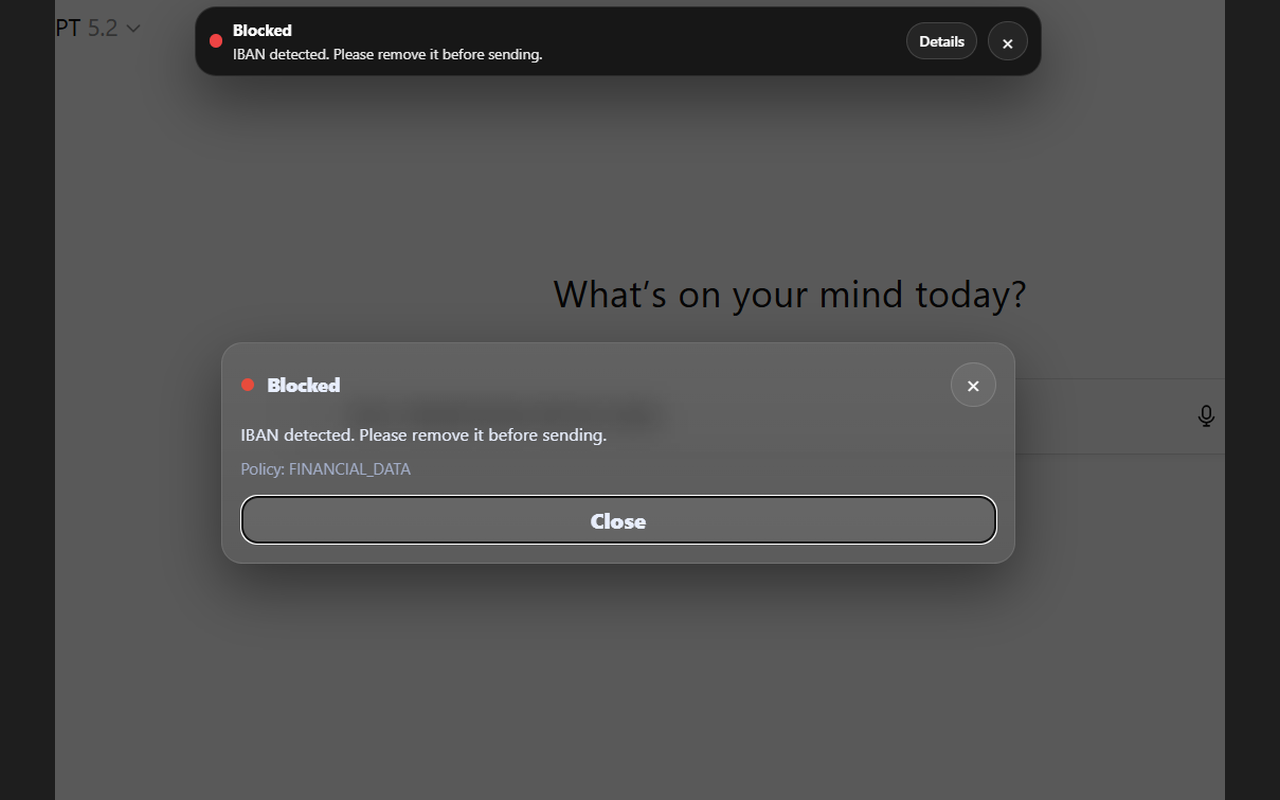
- Financial data such as valid IBAN patterns
- Payment card combinations such as card plus CVV or expiry
- Secrets and tokens including API keys and JWT-like patterns
- PII indicators such as email, phone number, and address-like text
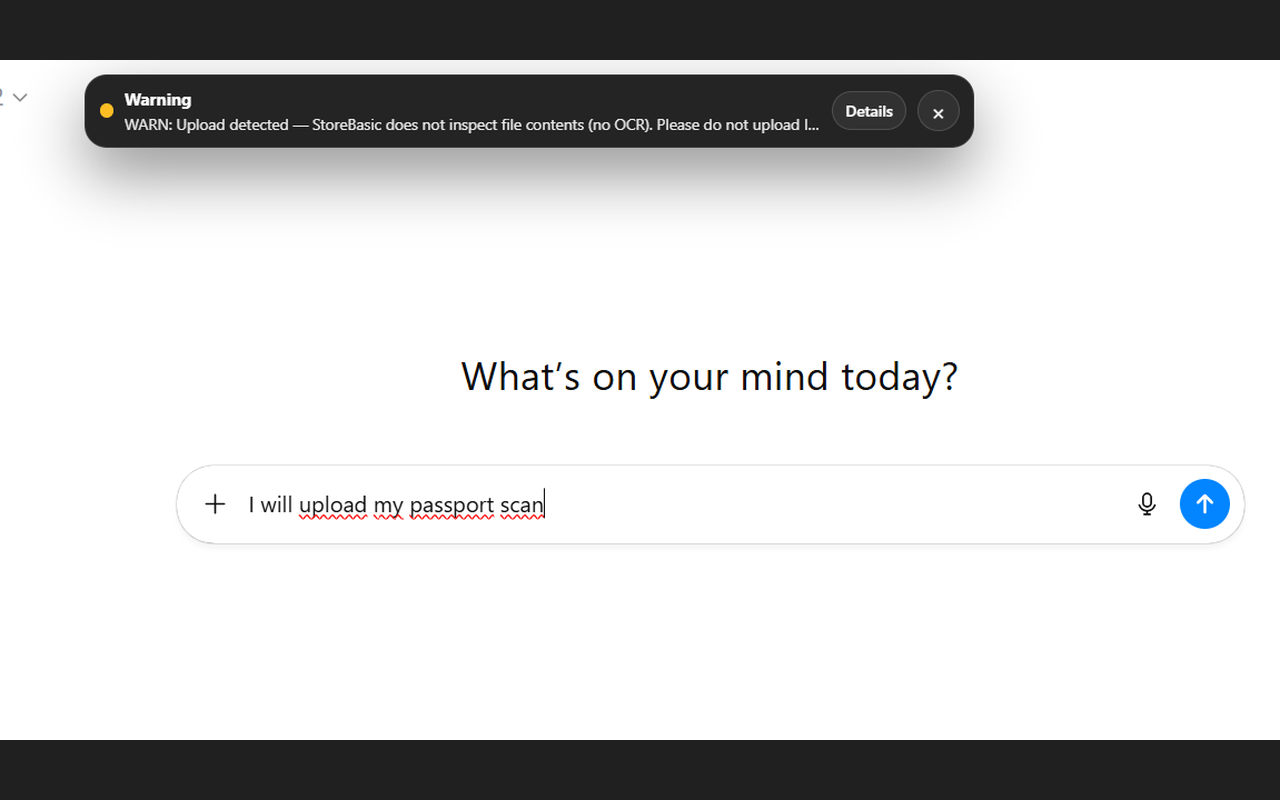
- Upload events without file inspection in StoreBasic
Why that matters
- It helps reduce accidental data exposure during everyday AI use
- It supports more deliberate prompt handling before submission
- It adds a local governance layer instead of relying only on downstream controls
- It supports privacy-first workflows for professionals and businesses
For yearly business licensing and product comparison, see Trust-Prompt Pricing.
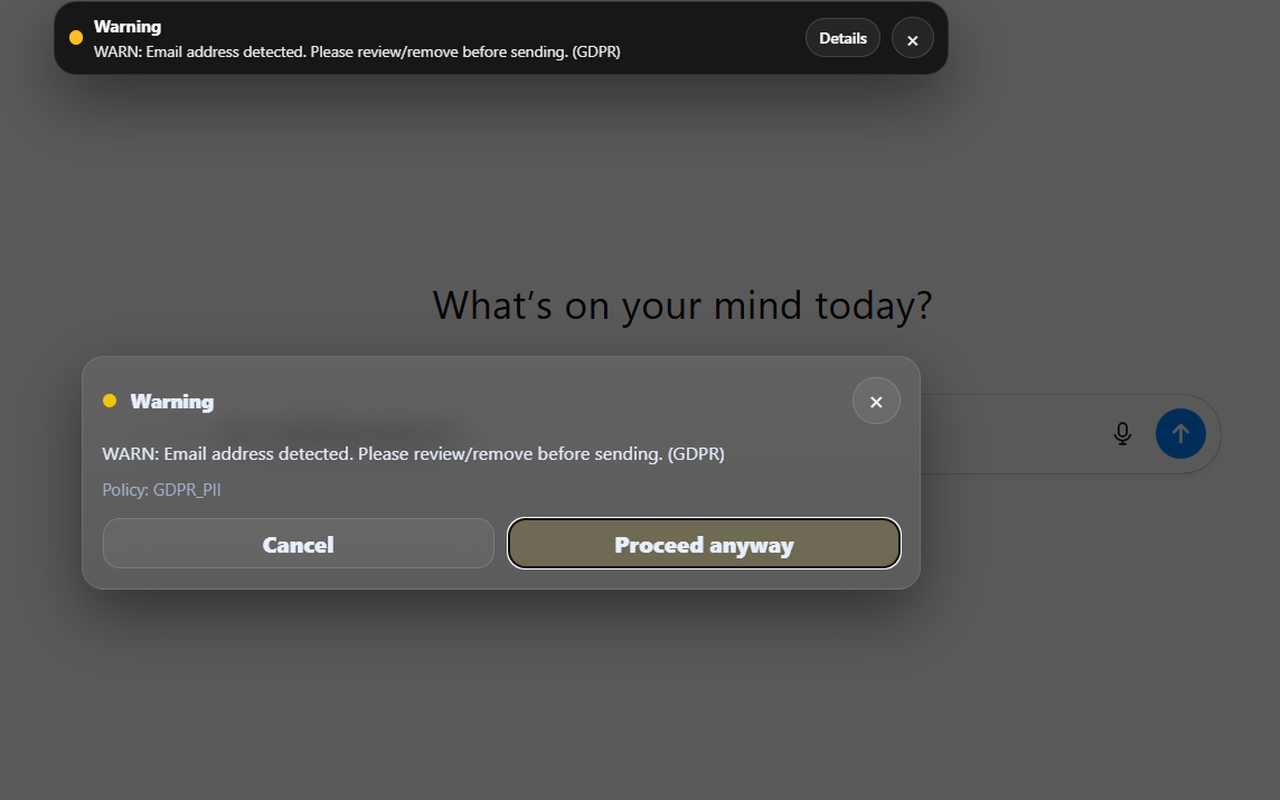
Step 3: clear outcomes with allow, warn, or block
Trust-Prompt is built around clear outcomes. In a normal workflow, content can continue. In a more sensitive workflow, the product can warn or block before submission depending on the rule logic and licensed governance setup.
Allow
Normal content can continue without unnecessary friction.
Warn
Potentially sensitive content can trigger a review step before the user decides whether to continue.
Block
Clearly risky content can be stopped before it leaves the page.
Governance value
This creates more control exactly where it matters most: before prompts are sent.
Trust-Prompt Plus features for governance-oriented workflows
Trust-Prompt Plus is designed for professionals and smaller businesses that want a stronger local AI governance model without moving straight into a larger enterprise deployment.
Trust-Prompt Plus feature set
- Policies for governance logic and rule behavior
- Scopes for controlling where Trust-Prompt runs
- Upload Policy for allow, warn, or block logic on uploads
- Redaction to support safer workflows with sensitive content
- Self-Test for local rule testing
- Verification Matrix for structured rule validation
- Policy Pack for configuration portability and governance setup
- Audit Visibility for local governance insight
How Trust-Prompt Plus is purchased
We license Trust-Prompt Plus yearly per business for smaller-scale business use.
To use the licensed version, first download Trust-Prompt Plus from the Chrome Web Store and then contact us to request a license. After that, we send the payment details or an invoice, and we deliver the license key once payment has been received.
See the Pricing page and Terms of Service for details.
Audit visibility in Trust-Prompt Plus
One important Plus feature is audit visibility. This gives professionals and smaller businesses a better governance view of checks, warnings, blocks, and related signals in a local product context.
Checks
Warnings
Blocks
Purpose
Local governance visibility for Trust-Prompt Plus workflows.
File uploads and upload policy
File handling is an important part of AI governance. In the StoreBasic model, Trust-Prompt does not inspect files, perform OCR, or analyze document contents. Instead, it can detect the upload event and warn the user.
Trust-Prompt Plus extends this with upload policy controls, so the organization can define whether upload-related behavior should be allowed, warned, or blocked according to its own governance needs.
Why Trust-Prompt Plus matters for smaller business environments
Not every company needs a large enterprise rollout from the start. Trust-Prompt Plus is positioned for professionals and smaller business environments that want more local AI governance controls without moving immediately to a broader enterprise deployment.
Policies and scopes
Define where Trust-Prompt runs and how governance logic should behave across supported AI websites.
Redaction and safer workflows
Support more practical workflows by masking or reducing sensitive content instead of forcing only one hard outcome.
Self-Test and Verification Matrix
Support structured rule testing and clearer internal validation of the local ruleset.
Policy Pack and Audit Visibility
Support governance configuration, portability, and local visibility for smaller-scale business use.
Privacy by design and local-first product logic
Trust-Prompt follows a privacy-first approach because prompt checks should stay as close to the user as possible. In the StoreBasic model, checks run locally instead of relying on remote AI prompt inspection, and that supports data minimization as well as a more controlled AI workflow.
- No unnecessary telemetry as part of the described local-first StoreBasic model
- No remote AI prompt evaluation as the core StoreBasic workflow
- No prompt-content-first logging model as the core product promise on this page
- Local governance logic designed to support safer AI usage before submission
Trust-Prompt is a technical safeguard. It supports safer AI use and more controlled prompt workflows, but it does not replace legal advice, internal compliance processes, or organization-specific risk assessment.
Related pages: Trust-Prompt Plus · Pricing · Why Trust-Prompt · Terms of Service · Privacy Policy · Contact
External references: GDPR on EUR-Lex · EU AI Act on EUR-Lex · European Commission AI framework